
Availability: In Stock
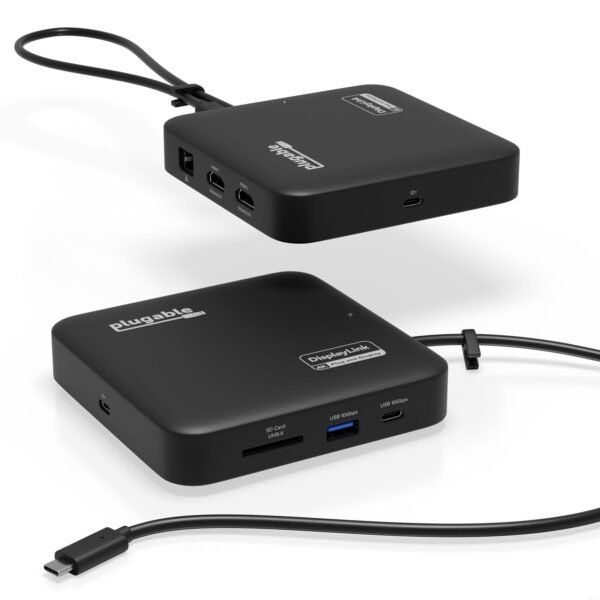
Plugable USBC-6950PDZ USB-C Dual HDMI 100W USB-C PD Docking Station
$ 90.72
Description 7 Port Mini DockPlugable’s 7-in-1 mini docking station for Windows and Mac packs in 2x HDMI, USB-A and USB-C, 82W pass-through charging, Gigabit ethernet, and an SD card slot. And it’s small and sturdy enough to take on the road Dual 4KThis USB C to HDMI Hub uses DisplayLink to deliver 2x 4K 60Hz extended HDMI displays for an incredibly clear picture and without the need for special video capabilities from your laptop. It’s worth noting that a driver download is required (automatic on Windows) 100W ChargingFor systems that can charge via USB-C, plug your laptop’s USB-C power adapter directly into the USB-C dock for charging (accepts up to 100W from a power adapter-82W pass-through). Compatible with the same 45W to 100W USB-C power supplies provided with the laptop CompatibilityFor Windows 10 , macOS 11 computers w/USB-C, Thunderbolt 3 / 4, USB4. Ideal for web and productivity apps like Google Docs, Office. Not for gaming, graphics-intensive or design work. No support of HDCP-protected content like Netflix At first glance, you might think our USB-C Dual HDMI Docking Station (USBC-6950PDZ) is just a simple USB-C hub for adding more ports. It’s certainly small enough. And, if you had the need, you’d no doubt appreciate that it’s every bit as travel-ready as a hub. But this dock is more than a slim profile, it’s a complete desktop experience. Consider the Dual 4K HDMI ports. Because they don’t require any special video features or capabilities from your computer to work, they can support two displays even on a USB-C port that might otherwise not have supported any. And users can keep expanding by connecting to the Gigabit Ethernet, high-speed USB ports with charging, and SD slot. Dual 4KThere’s a lot of big talk about the USBC-6950PDZ’s slim size, but the first feature to focus on should be its HDMI ports. With this HDMI hub, extend your display across two monitors with resolutions up to 4K60Hz. For this docking station, we used DisplayLink Technology. That means you can connect two monitors to your fully-featured modern USB-C enabled laptop computer with Windows or macOS – including Apple Silicon M1 / M2 / M3 MacBook Air or MacBook Pro. Just a heads up, you will need to download the DisplayLink Manager application to get full functionality for macOS devices. On Windows machines, the required driver will download automatically through Windows Update (or get the latest version available through our website). DisplayLink installation requires administrative permissions, for computers provided by your employer or school we recommend contacting your technical support team to ensure DisplayLink software may be installed. The Power to Power ThroughA somewhat unique approach to powering a docking station, the USBC-6950PDZ doesn’t have its own power supply. Instead, it uses the USB-C power cord that came with your laptop. The docking station takes advantage of USB-C pass-through charging, here’s how it works: find your laptop’s power cord, plug it into the marked port on the USBC-6950PDZ, and now plug the docking station into your laptop. The dock will support up to a 100W power adapter, reserving up to 18W for itself. So if you have a 100W adapter, your computer will receive 82W of power—more than enough to keep you going all day. However, the computer may charge slower through the docking station than when directly connected to the power supply. Travel-ReadyThis particular unit is a dual monitor docking station that happens to be slim, and incredibly portable. Not everyone will need to take their dock with them on the road, or to their hybrid office. And for those folks, the USBC-6950PDZ is remarkable for packing a full feature set into such a small footprint. But, for those who do need to take it with them, this sturdy little dock is ready. And, because it uses the laptop power adapter you’re already carrying, it saves the weight and space of a second power brick. In the Box1x Plugable USBC-6950PDZ Dual HDMI Portable Docking Station1x Quick Start Guide
Related products